
componentes
- arduino
- dht11 / dht22
- resistencia 4.7k
Esquema
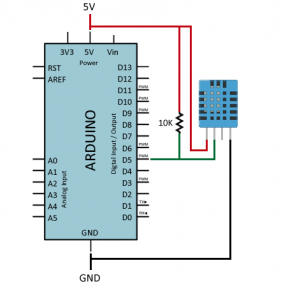
diagrama
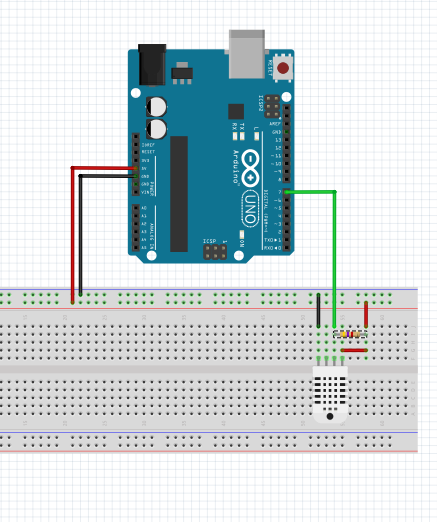
Libreria
Libreria : conceptronic
Libreria para programar el dht : DHT-Library
Codigo
// Ejemplo de uso de dht

#include "DHT.h"

#define DHTPIN 7 // Pin de conexion de datos del dht22

// Uncomment whatever type you're using!
//#define DHTTYPE DHT11 // DHT 11
#define DHTTYPE DHT22 // DHT 22 (AM2302)
//#define DHTTYPE DHT21 // DHT 21 (AM2301)

// Connect pin 1 (on the left) of the sensor to +5V
// Connect pin 2 of the sensor to whatever your DHTPIN is
// Connect pin 4 (on the right) of the sensor to GROUND
// Connect a 10K resistor from pin 2 (data) to pin 1 (power) of the sensor

DHT dht(DHTPIN, DHTTYPE);

void setup() {
 Serial.begin(9600); // establecemos velocidad puerto serie
 Serial.println("Inicio!");

 dht.begin(); // inicializamos el DTH
}

void loop() {
 // Establecemos un tiempo de espera entre lecturas.
 delay(5000);

// Reading temperature or humidity takes about 250 milliseconds!
 // Sensor readings may also be up to 2 seconds 'old' (its a very slow sensor)
 float humedad = dht.readHumidity();
 // Read temperature as Celsius
 float temeperatura = dht.readTemperature();
 // Read temperature as Fahrenheit
 float f = dht.readTemperature(true);

 // Check if any reads failed and exit early (to try again).
 if (isnan(humedad) || isnan(temeperatura) || isnan(f)) {
 Serial.println("Failed to read from DHT sensor!");
 return;
 }
 Serial.print("Humidity: ");
 Serial.print(humedad);
 Serial.print(" %\t");
 Serial.print("temeperatura: ");
 Serial.print(temeperatura);
 Serial.println(" *C");
}
caracteristicas del sensor dht
